• This forum is the machine-generated translation of www.cad3d.it/forum1 - the Italian design community. Several terms are not translated correctly.

inventor 2012

  • Thread starter Thread starter davide75
  • Start date Start date
I introduce myself to this post:
it is for years that we use inv 10, next week we will pass to 2012! By putting sp1, our dealer will install two licenses.
some questions about this:
1. Migration: Is there an automatic way to migrate data from v10 to v2012 or do I have to check out all the no/s manually?
2. novelty: I read that 201 has little news than 2010/2011, but surely it will be light years ahead of prehistoric 10, you know what are the most relevant differences?
3. use: according to your experience, when you use it to get used to the new interface? I am used to the old double bar on the left!!
4. template: all templates are set with tables, stamps, materials matured over time, will all be recognized since 2012?

then cmq we will have the technician available, but I would prefer to get prepared. . .
Thank you!
 
1. Migration: Is there an automatic way to migrate data from v10 to v2012 or do I have to check out all the no/s manually?
It is, not only more convenient, but also recommended to do migration by not opening files and saving them, but with "programming operations". Just choose the folders that contain all the files to migrate and start the whole... Take into account that if you have so much data, you can put a few hours on it, maybe you should let him leave in the evening to find everything ready the next morning.
 
Hello, guys.

I don't know if you can help me, but I would have some dificulties with the threads with inventor 2012.. I used for a different time 2009 and 2010, so I knew how to make them (very simple among other things), but I have dificulty with this click version on the icon but no window opens to me for the setting of the thread selecting the affected surface happens... .
I gave an eye on the autodesk site and I don't understand the second point of the procedures. . .

- uncheck the display option in the template to disable the display of the threads.
http://wikihelp.autodesk.com/enu?ad...md&language=ita&release=2012&product=inventorDo I have to uncheck something to access the command? ? ?

Thank you very much
 
It is, not only more convenient, but also recommended to do migration by not opening files and saving them, but with "programming operations". Just choose the folders that contain all the files to migrate and start the whole... Take into account that if you have so much data, you can put a few hours on it, maybe you should let him leave in the evening to find everything ready the next morning.
Okay, thank you.
I am sure that the technician who comes to install will also think of this, but thank you for the advice! So if he doesn't think about it, I'll ask him directly.

:finger:
 
yesterday I made a very long phone call with the ammerians because they wanted to see my work on big assemblies, one thing they told me is that they solved the problem of the lods at the table, that when you put the partlist the nice job on the lods to a ramengo and inv it loads all that was suppressed..... :d :d
That's what I'm interested in. That's what I'm interested in. That's what partlist doesn't look like, I did some tests, but apparently the problem persists.
 
Good morning, everyone!

in the office we have a problem on one of the 3 stations where inventor 2012 is installed.
the problem is as follows: from a few days, opening the files (draws/parts/assis) from vault, opens a new inventor session for each open file. only that pc has this type of problem, while the other 2 stations open different files in a single session. Does anyone please know how to fix things?

Thank you so much in advance!
 
It is, not only more convenient, but also recommended to do migration by not opening files and saving them, but with "programming operations". Just choose the folders that contain all the files to migrate and start the whole... Take into account that if you have so much data, you can put a few hours on it, maybe you should let him leave in the evening to find everything ready the next morning.
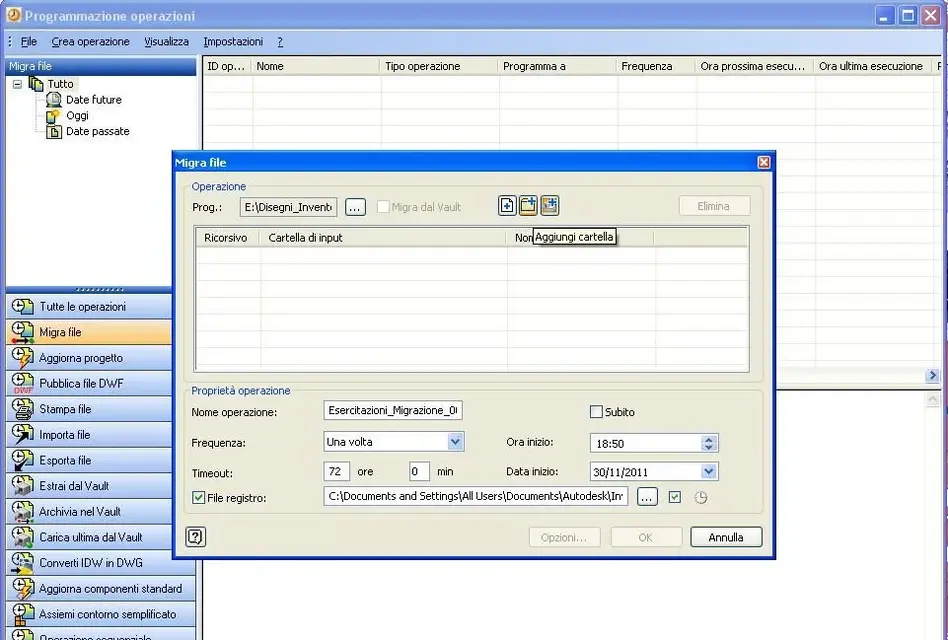
I arrived at the point of having to do the migration, in 2012 bnon I find the voice programming operations, could you please help me? I would also need a quick explanation of how to use that command, until now I never needed it.. :rolleyes:
Thank you! !
 
I arrived at the point of having to do the migration, in 2012 bnon I find the voice programming operations, could you please help me? I would also need a quick explanation of how to use that command, until now I never needed it.. :rolleyes:
Thank you! !
Hi, alby.

I have the command with the 2012 version and is located in: "c:\documents and settings\all users\menu startup\programs\autodesk\autodesk inventor 2012\strumenti

Open it, set the migration and you should be fine.

to carry out the operation should be: "create operation" -> "migra file" -> then "add files/folder/project" depending on what you want to migrate, launch the command and he should convert all the files of your folder or set up in the current version.
Try to see if you have it.:smile:
 

Attachments

  • Invnetor_Migrazione_file.webp
    Invnetor_Migrazione_file.webp
    56.6 KB · Views: 10
I didn't know that window. I already did a test in a test project file and it seems to work. In the options I took out the "delete file." I was afraid to leave it, you know whether it is useful or not to leave it?
 
I didn't know that window. I already did a test in a test project file and it seems to work. In the options I took out the "delete file." I was afraid to leave it, you know whether it is useful or not to leave it?
you did well to remove the check because from what you read in the guide, it should delete the previous versions of the files once the migration is completed, so, not to be able to read or write, I think it is better to remove it and keep the backup copies of the old files.:finger:
 
Clear, so would a copy of everything be kept inside oldversions folders or somewhere else?
 
Clear, so would a copy of everything be kept inside oldversions folders or somewhere else?
Yes, it should be all within the oldversion folder of each project. I say it should because I have no certainty, but since the dates of the files contained within that folder are those related to the rescue made with the latest version of inventor used and those in the project folder are with the date of migration, things should be so.
 
You're right! I checked, there are all the original files.
I'll follow this path, I hope I don't hack the server with the duplication (we use a temporary with limited space. . . )
Thanks for the tip!
 
hi to everyone, I write here because I need your evaluation on the possible causes of an incorrect operation of inventor 2012 on the workstation in the office.

I leave with a premise. pc workstation completely new and with only installed the complete package of inventor 2012 professional version and not completed.
characteristics: hp workstation - core i5 - 12gb ram - nvidia 4000 picture - windows seven professional 64 bit.

same application package (installed only inventor and mechanical) on a computer assembled.
characteristics: core 2 duo e7300 - 4gb ram - sapphire ati radeon hd4850 - windows xp professional 32 bit.

using the mechanical cad application there is not a lot of problems on both machines, the troubles begin when switching to the inventor application.

the problem is the speed expressed by these two machines with the same software application... the PC assembled is much faster than the workstation in opening the same parts or together files... is faster in generating views on the boards for the same parts or together... it is faster to update small and big changes both on a set and on all the views on the tables. . .

These are complex combinations that vary from 500 to 800 details both on our design, and on components present in the contained center.

now as you can think, having spent the beauty of 1000 and spends € for a new workstation that gets beat by a pc of the cost of 600€ that at the hardware level has nothing to do with the owner really pisses off.

according to you what could be checked to understand why this net gap between the two machines and especially considering that new workstations are 3...

Thank you.
Hi.
 
hi to everyone, I write here because I need your evaluation on the possible causes of an incorrect operation of inventor 2012 on the workstation in the office.

I leave with a premise. pc workstation completely new and with only installed the complete package of inventor 2012 professional version and not completed.
characteristics: hp workstation - core i5 - 12gb ram - nvidia 4000 picture - windows seven professional 64 bit.

same application package (installed only inventor and mechanical) on a computer assembled.
characteristics: core 2 duo e7300 - 4gb ram - sapphire ati radeon hd4850 - windows xp professional 32 bit.

using the mechanical cad application there is not a lot of problems on both machines, the troubles begin when switching to the inventor application.

the problem is the speed expressed by these two machines with the same software application... the PC assembled is much faster than the workstation in opening the same parts or together files... is faster in generating views on the boards for the same parts or together... it is faster to update small and big changes both on a set and on all the views on the tables. . .

These are complex combinations that vary from 500 to 800 details both on our design, and on components present in the contained center.

now as you can think, having spent the beauty of 1000 and spends € for a new workstation that gets beat by a pc of the cost of 600€ that at the hardware level has nothing to do with the owner really pisses off.

according to you what could be checked to understand why this net gap between the two machines and especially considering that new workstations are 3...

Thank you.
Hi.
Bye.

In my opinion the hardware of the workstation for the office is great (by the way what type of hard disk you have?) and therefore I do not think it is a problem to charge to the hardware, rather, in my humble opinion, I think it is attributable to windows 7 64 bit and its interaction with inventor 2012.

In fact, according to me, seven and inventor do not fit perfectly as they should, you want for a non-perfect programming of the 64-bit code each other, you want for those who know what other problem, but in fact there must be something at the software level that slows inventor in almost all of the operation (at least if I understand correctly, it seems to me that slowing in everything:biggrin:).

This problem of software incompatibility is evidently absent in the 32-bit version on xp, so even a non-exceptional machine is enough to make it turn far better. this because, oviously, the 32-bit version being on the market for a long time and being the first (the 64-bit operating systems with its programs have been on the market for relatively little time compared to the 32-bit systems, at least, there have always been, but their diffusion was limited and the field of application was niche, server type, unix systems, etc.,) had more way to be tested and optimized.

I also for example on my home pc, a 2 e8400 core with 4 gb ram, video card geforce and windows xp 32 bit, I have no processing speed problem with inventor.

to come to your problem, generally these are inconveniences that you should solve with the installation of the various service packs for which you might try to install the last one if you haven't already done it, or alternatively, try to contact your autodesk dealer and try to expose it.

Bye.
 
something strange at the level of integration must be, but I'd have more impurities at the win7 than at the 64 bit:
to me it happens that inv 11 with s.o. xp mounted on 64-bit workstations,it was much better and faster than inv12 with win7 mounted on the same workstation as before... , sometimes it is also half a minute to "think" before opening a new file. . .
 
we say that you have also come to the same conclusion. before buying these new workstations, we had other hardware labels say not very recent, but those with inventor 2011 and windows xp 32bit never had any problem and turned like splinters.

the installation of inventor and all packages has been followed on all 3 new machines directly from our autodesk dealer (it was directly him to give advice on the hardware to use) and if I don't remember bad they have already installed the service pack 1 for all programs.. .

Monday, I think I'll make myself feel with the dealer to get to a conclusion.

thanks to all
Hi.
 
Unfortunately I am only a designer and computers are followed by an external company for various software and hardware problems, while drawing programs from our official dealer also for remote assistance.

this involves the non-possible to put hand to installation and uninstallation of software from the machines used.

tomorrow I will try to make a call to our dealer and I will ask for injuries on possible solutions.

Thank you.
Hi.
 

Forum statistics

Threads
44,997
Messages
339,767
Members
4
Latest member
ibt

Members online

No members online now.
Back
Top